Sailing Seas of Scientific Nim
Pietro Peterlongo, AgileLab
Compute Paris, Nov 2026
About me
draft
slide 0.2
The mainland
draft
slide 1.1
Why so many languages?
draft
slide 1.2
Nim's tradeoffs
draft
slide 1.3
The map
- Island 1: Accessible Performance
- Island 2: Success Stories
- Island 3: Data Stack
- Island 4: Interoperability
- Island 5: An Expressive Language
- Island 6: Interactivity
- Island 7: Notebook
Island 1
- Island 1: Accessible Performance
- Island 2: Success Stories
- Island 3: Data Stack
- Island 4: Interoperability
- Island 5: An Expressive Language
- Island 6: Interactivity
- Island 7: Notebook
Reads like Python
draft
slide 2.2
Runs like C
draft
slide 2.3
No ceiling
draft
slide 2.4
Island 2
- Island 1: Accessible Performance ✓
- Island 2: Success Stories
- Island 3: Data Stack
- Island 4: Interoperability
- Island 5: An Expressive Language
- Island 6: Interactivity
- Island 7: Notebook
Success stories
How do we define success stories in scientific computing? By looking at people who used Nim to advance science.
The following are two stories:
🧬 Bioinformatics and ☀️ Physics
Beyond science, Nim runs on the web, in blockchains, security tools, games, chips and more: Nim success stories beyond science
🧬 Brent Pedersen · @brentp
Genomics researcher and software developer:
6 papers on 6 Nim tools (2018-2022),
with 1,944 citations and 1,833 stars.
Others followed
(awesome-bionimformatics)
| tool | year | citations | stars |
|---|---|---|---|
| mosdepth | 2018 | 1452 | 878 |
| somalier | 2020 | 172 | 341 |
| slivar | 2021 | 141 | 274 |
| duphold | 2019 | 93 | 109 |
| STRling | 2022 | 68 | 72 |
| hts-nim | 2018 | 18 | 159 |
# read a file of DNA reads aligned to the genome
import hts
var b: Bam
open(b, "sample.bam", index=true)
# reads in a region of chromosome 6
for r in b.query("6", 30816675, 32816675):
  # keep reads placed with confidence
  if r.mapping_quality > 10u:
    # where each read sits on the genome
echo r.chrom, r.start, r.stopbrentp.github.io; citations from Google Scholar, stars from GitHub (October 2026); the tools and the genomics behind them, explained
☀️ Sebastian Schmidt · @Vindaar
A PhD student in Physics searching for solar axions
at CERN's CAST:
the entire analysis code base is written in Nim.
He ended up building an important part
of the data stack in Nim
# how many axions the Sun sends us at energy E_a,
# per keV, cm² and second; units checked when compiling
proc axionFluxPrimakoff(E_a: keV,
                        g_aγ: GeV⁻¹): keV⁻¹•cm⁻²•s⁻¹ =
  let g₁₀ = g_aγ / 1e-10.GeV⁻¹
  result = g₁₀^2 * 3.821e10.cm⁻²•s⁻¹•keV⁻¹ *
    (E_a / 1.keV)^3 / (exp(E_a / (1.103.keV)) - 1)
Thesis (University of Bonn, 2024), source, code, data; the thesis in plain words
Rocks ahead
A tiny ecosystem: pioneers build what they need, or move where the libraries are
I mostly switched to rust since that's where the bioinformatics libs are, but I still really like nim
by choosing Nim [...] I underestimated the amount of code I would / had to write [...] I learned way more than I would have otherwise
Island 3
- Island 1: Accessible Performance ✓
- Island 2: Success Stories ✓
- Island 3: Data Stack
- Island 4: Interoperability
- Island 5: An Expressive Language
- Island 6: Interactivity
- Island 7: Notebook
The stack
The building blocks of data science, as in the Python Data Science Handbook by Jake VanderPlas:
| Python | R | Nim | |
|---|---|---|---|
| Tensors | NumPy | arrays, matrices | Arraymancer |
| Dataframes | pandas | dplyr | Datamancer |
| Plots | matplotlib | ggplot2 | ggplotnim |
Meet the penguins
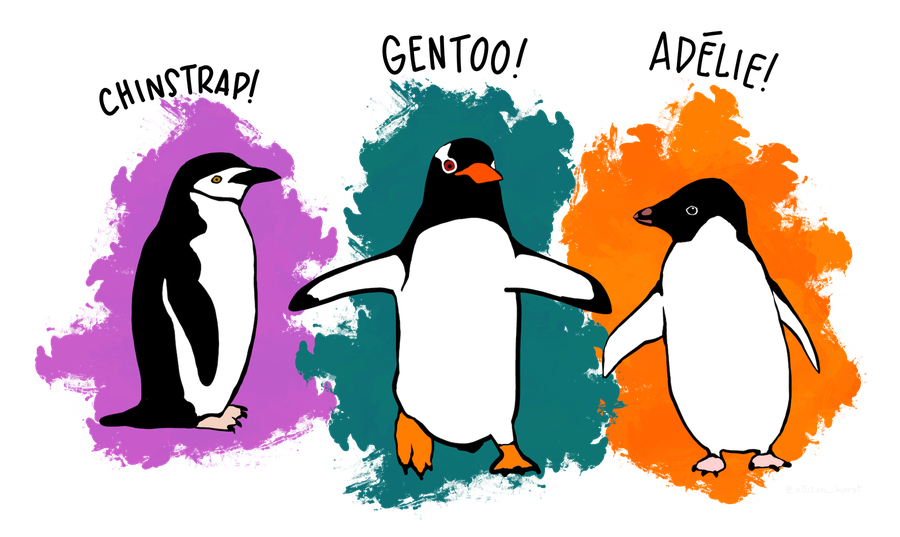
344 penguins, three species, three islands near Palmer Station, Antarctica. The explainer explores them further: missing values, group and summarize, three plots, Simpson's paradox with tensors, k-means clustering.
Data: Gorman, Williams and Fraser (2014), palmerpenguins (CC0). Artwork by @allison_horst.
Dataframes: Datamancer
let df = readCsv("data/penguins.csv")
  .filter(f{`body_mass_g` > 0.0}) # drop missing

echo df.group_by("species").summarize(
  f{float: "mass (g)" << mean(`body_mass_g`)},
  f{float: "flipper (mm)" << mean(`flipper_length_mm`)})
DataFrame with 3 columns and 3 rows:
Idx species mass (g) flipper (mm)
dtype: string float float
0 Adelie 3701 190
1 Chinstrap 3733 195.8
2 Gentoo 5076 217.2
Inspired by dplyr, built on Arraymancer.
Plots: ggplotnim
A port of ggplot2, using Datamancer dataframes.
ggplot(df, aes("flipper_length_mm", "body_mass_g",
               color = "species")) +
  geom_point() +
  ggsave("images/penguins.png", width = 500, height = 320)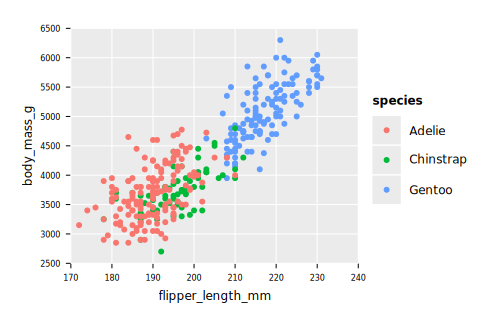
Tensors: Arraymancer
let cols = ["bill_length_mm", "bill_depth_mm",
            "flipper_length_mm", "body_mass_g"]
let X = stack(cols.mapIt(df[it, float]), axis = 1) # 342 x 4
let Z = (X -. X.mean(axis = 0)) /. X.std(axis = 0)
let C = Z.transpose * Z / float(X.shape[0] - 1) # correlations
echo C.map_inline(x.round(2))
Tensor[system.float] of shape "[4, 4]" on backend "Cpu" |1 -0.24 0.66 0.6| |-0.24 1 -0.58 -0.47| |0.66 -0.58 1 0.87| |0.6 -0.47 0.87 1|
More than an ndarray: linear algebra, autograd, neural networks, CPU, CUDA and OpenCL backends.
SciNim
SciNim gathers the scientific Nim libraries. Start from getting started: tutorials and a list of libraries. A few more:
- flambeau: bindings to libtorch
- nim-plotly: interactive plots with plotly.js
- numericalnim: integration, ODEs, optimization, interpolation
Rocks ahead
- no scikit-learn: ML algorithms are scattered
- multiple tensor libraries
- the ecosystem depends on a few contributors (Vindaar, mratsim, Clonkk, HugoGranstrom): when life happens, development stops
Island 4
- Island 1: Accessible Performance ✓
- Island 2: Success Stories ✓
- Island 3: Data Stack ✓
- Island 4: Interoperability
- Island 5: An Expressive Language
- Island 6: Interactivity
- Island 7: Notebook
Wrapping C and C++
draft
slide 5.2
Bridges
draft
slide 5.3
Nim from Python
draft
slide 5.4
Rocks ahead
draft
slide 5.5
Island 5
- Island 1: Accessible Performance ✓
- Island 2: Success Stories ✓
- Island 3: Data Stack ✓
- Island 4: Interoperability ✓
- Island 5: An Expressive Language
- Island 6: Interactivity
- Island 7: Notebook
Custom Operators: defined
You can define custom operators easily in Nim, as a normal function, using backticks.
type
  Line = object   # through p, along d
    p: Point
    d: Vec
  Plane = object  # through p, normal n
    p: Point
    n: Vec

func `+`(a, b: Point): Line = Line(p: a, d: b - a)
func `+`(l: Line, c: Point): Plane =
  Plane(p: l.p, n: l.d × (c - l.p))
func `*`(l: Line, s: Plane): Point =
l.p + ((s.p - l.p) ∙ s.n) / (l.d ∙ s.n) * l.dCustom Operators: applied
A line is defined by two points, a plane is defined by three points, they generically intersect in one point.
func pt(x, y, z: float): Point = Point(x: x, y: y, z: z)

let
  line = pt(1, 2, 3) + pt(2, 3, 1)
  plane = pt(0, 0, 0) + pt(1, 0, 0) + pt(0, 1, 0)
echo line * plane
(2.50, 3.50, 0.00)
Macros to define Units
unchained by Vindaar:
units checked at compile time, plain floats at run time.
Its declareUnits macro declares the SI units,
and provides an API to add your own units:
declareUnits:
  BaseUnits:
    Gram:
      short: g
      prefix: siKilo
      quantity: Mass
    Meter:
      short: m
      quantity: Length
    ...
declareUnits:
Derived:
SolarMass:
short: Msun
quantity: Mass
conversion: 1.98847e30.kg
EarthMass:
short: Mearth
quantity: Mass
conversion: 5.9722e24.kgThe macro writes the types, the aliases and the conversions;
*, / and + are macros that work out the unit of the result.
Units applied
Kepler's third law: how long is a year, for a planet or a moon?
func period[L: Length, M: Mass](a: L, mass: M): Second =
  (2 * PI * sqrt(a^3 / (G_Newton * mass))).to(Second)

echo "Mars: ", period(1.524.AU, 1.Msun).to(yr)
echo "Moon: ", period(384_400.km, 1.Mearth).to(day)
echo compiles(1.AU + 1.Msun) # Length + Mass
Mars: 1.88139 yr Moon: 27.4518 day false
Rocks ahead
draft
slide 6.6
Island 6
- Island 1: Accessible Performance ✓
- Island 2: Success Stories ✓
- Island 3: Data Stack ✓
- Island 4: Interoperability ✓
- Island 5: An Expressive Language ✓
- Island 6: Interactivity
- Island 7: Notebook
The original Shiny app
draft
slide 7.2
The Nim port
draft
slide 7.3
Rocks ahead
draft
slide 7.4
Island 7
- Island 1: Accessible Performance ✓
- Island 2: Success Stories ✓
- Island 3: Data Stack ✓
- Island 4: Interoperability ✓
- Island 5: An Expressive Language ✓
- Island 6: Interactivity ✓
- Island 7: Notebook
Literate computing
draft
slide 8.2
nimib
draft
slide 8.3
Rocks ahead
draft
slide 8.4
Back on land
- Island 1: Accessible Performance ✓
- Island 2: Success Stories ✓
- Island 3: Data Stack ✓
- Island 4: Interoperability ✓
- Island 5: An Expressive Language ✓
- Island 6: Interactivity ✓
- Island 7: Notebook ✓
For the beginner
draft
slide 9.2
For the builder
draft
slide 9.3
Your language, seen from Nim
draft
slide 9.4
Why still niche?
draft
slide 9.5
animation built with p5nim (explained here) and inspired by a sketch by Okazz, CC BY-NC-SA 3.0