🏡 island3_penguins_explainer.nim

Penguins with the Nim data stack

In the talk Sailing Seas of Scientific Nim, Island 3 sails past the Nim data stack: tensors with Arraymancer, dataframes with Datamancer and plots with ggplotnim. They play the roles of NumPy, pandas and matplotlib in the Python Data Science Handbook by Jake VanderPlas, or of arrays, dplyr and ggplot2 in R. The slides only have room for one example each. This page explores the penguins a bit further, with the same three libraries. All the code on this page runs when the page is built, and the output below each block is its real output.

The data

The palmerpenguins dataset has 344 penguins of three species, from three islands of the Palmer Archipelago, Antarctica, collected by Kristen Gorman at Palmer Station LTER. It is CC0, and the friendly replacement of the iris dataset. We use the CSV that ships with seaborn, where missing values are empty fields (docs/data/penguins.csv).

let raw = readCsv("data/penguins.csv")
echo raw.head(5)
DataFrame with 7 columns and 5 rows:
     Idx              species               island       bill_length_mm        bill_depth_mm    flipper_length_mm          body_mass_g                  sex
  dtype:               string               string                float                float                float                float               string
       0               Adelie            Torgersen                 39.1                 18.7                  181                 3750                 MALE
       1               Adelie            Torgersen                 39.5                 17.4                  186                 3800               FEMALE
       2               Adelie            Torgersen                 40.3                   18                  195                 3250               FEMALE
       3               Adelie            Torgersen                  nan                  nan                  nan                  nan                   ""
       4               Adelie            Torgersen                 36.7                 19.3                  193                 3450               FEMALE

Datamancer guesses the type of each column. Empty fields in a number column become NaN, and NaN fails every comparison, so a filter on a positive body mass keeps the penguins that were measured:

let df = raw.filter(f{float -> bool: `body_mass_g` > 0.0})
echo raw.len, " penguins, ", df.len, " measured"
344 penguins, 342 measured

f{...} is a formula: a macro that turns the expression into a loop over the columns, compiled and typed. The backticks name a column, and float -> bool gives the type of the input columns and of the result. Without the hint, Datamancer guesses from the expression, and asks for a hint when it cannot.

Group and summarize

As in dplyr (or groupby and agg in pandas), group the rows and reduce each group with <<:

echo df.group_by(["species", "island"]).summarize(
  f{string -> int: "n" << len(col("species"))},
  f{float: "mass" << mean(`body_mass_g`)})
DataFrame with 4 columns and 5 rows:
     Idx      species       island            n         mass
  dtype:       string       string          int        float
       0       Adelie       Biscoe           44         3710
       1       Adelie        Dream           56         3688
       2       Adelie    Torgersen           51         3706
       3    Chinstrap        Dream           68         3733
       4       Gentoo       Biscoe          123         5076

Adelie penguins live on all three islands, Chinstrap only on Dream and Gentoo only on Biscoe. Some penguins have no recorded sex, so we filter them out before splitting by sex:

echo df.filter(f{string -> bool: `sex` != ""})
  .group_by(["species", "sex"])
  .summarize(f{float: "mass" << mean(`body_mass_g`)})
  .arrange("mass")
DataFrame with 3 columns and 6 rows:
     Idx      species          sex         mass
  dtype:       string       string        float
       0       Adelie       FEMALE         3369
       1    Chinstrap       FEMALE         3527
       2    Chinstrap         MALE         3939
       3       Adelie         MALE         4043
       4       Gentoo       FEMALE         4680
       5       Gentoo         MALE         5485

Plots

ggplotnim is a grammar of graphics, as ggplot2: a dataframe, aesthetics that map columns to x, y and color, then layers added with +. The slide plots flipper length against body mass:

ggplot(df, aes("flipper_length_mm", "body_mass_g",
               color = "species")) +
  geom_point() +
  ggsave("images/penguins_explainer_mass.png")
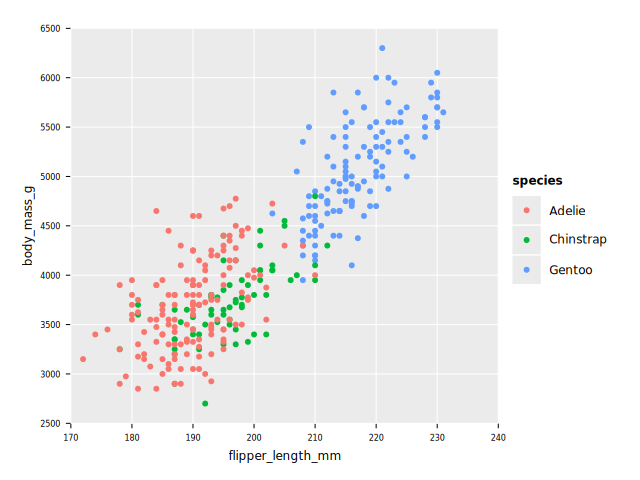
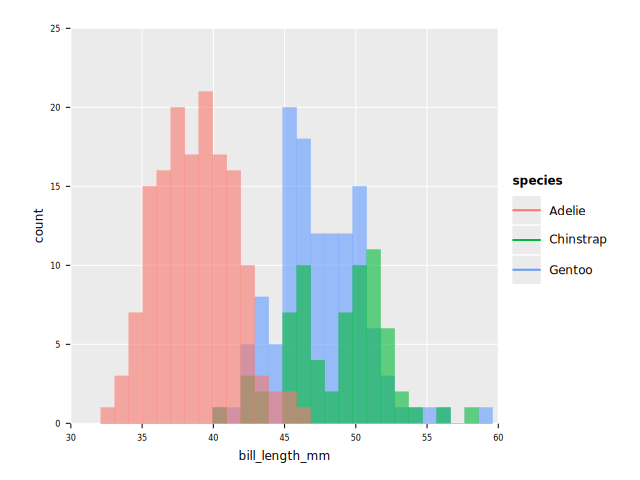
A histogram of the bill length, one color per species, with the bars of each species drawn over each other:

ggplot(df, aes("bill_length_mm", fill = "species")) +
  geom_histogram(binWidth = 1.0, position = "identity",
                 alpha = 0.6) +
  ggsave("images/penguins_explainer_bill.png")
And the classic one: bill length against bill depth.

ggplot(df, aes("bill_length_mm", "bill_depth_mm",
               color = "species")) +
  geom_point() +
  ggsave("images/penguins_explainer_simpson.png")
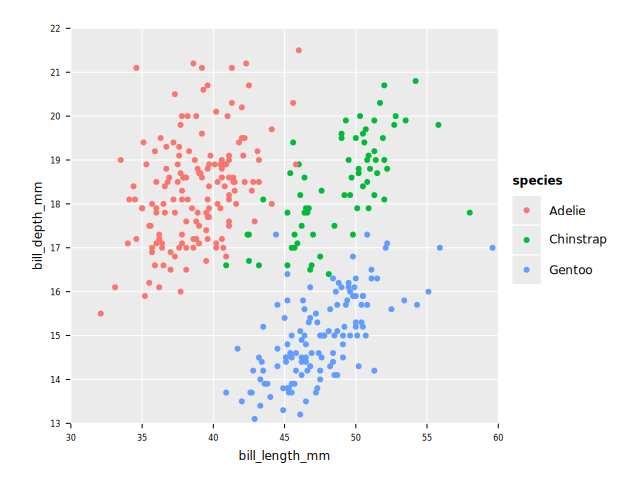
Inside each species, a longer bill goes with a deeper bill. Taken all together, the trend looks the other way, because Gentoo have long but shallow bills. This is Simpson's paradox, and the tensors below put a number on it.

Tensors

Every column of a dataframe is a tensor underneath, and df[name, float] gives it as a Tensor[float]. Arraymancer spells the broadcasting operators with a dot (-., /., *.), so a broadcast is always visible. The mean of the product of two z-scores is the (Pearson) correlation:

proc zscore(t: Tensor[float]): Tensor[float] =
  (t -. t.mean) /. t.std

proc corr(df: DataFrame, x, y: string): float =
  mean(zscore(df[x, float]) *. zscore(df[y, float]))

echo "flipper vs mass: ", corr(df, "flipper_length_mm", "body_mass_g").round(2)
echo "bill length vs depth, all: ", corr(df, "bill_length_mm", "bill_depth_mm").round(2)
for (key, sub) in groups(df.group_by("species")):
  echo "  ", key[0][1], ": ", corr(sub, "bill_length_mm", "bill_depth_mm").round(2)
flipper vs mass: 0.87
bill length vs depth, all: -0.23
  Adelie: 0.39
  Chinstrap: 0.64
  Gentoo: 0.64

Strong and positive for flipper length and body mass, as on the slide. For the bills, negative overall and positive within every species: Simpson's paradox in numbers. (std here divides by n - 1, so these are a hair below the exact correlation, which a statistics library would give.)

Some machine learning

Arraymancer has a few classic algorithms, among them k-means clustering. Put the four measurements in a matrix, standardize each column, and ask for three clusters:

let cols = ["bill_length_mm", "bill_depth_mm",
            "flipper_length_mm", "body_mass_g"]
var X = newTensor[float](df.len, cols.len)
for j in 0 ..< cols.len:
  X[_, j] = zscore(df[cols[j], float]).reshape(df.len, 1)

let clusters = kmeans(X, n_clusters = 3).labels
var withClusters = df
withClusters["cluster"] = clusters
echo withClusters.group_by(["species", "cluster"])
  .summarize(f{string -> int: "n" << len(col("species"))})
DataFrame with 3 columns and 5 rows:
     Idx      species      cluster            n
  dtype:       string          int          int
       0       Adelie            1           50
       1       Adelie            2          101
       2    Chinstrap            1           60
       3    Chinstrap            2            8
       4       Gentoo            0          123

Without looking at the species, k-means puts every Gentoo in a cluster of its own. Adelie and Chinstrap overlap in size and shape, so the other two clusters mix them: the measurements alone do not tell those two apart. Arraymancer also has PCA, DBSCAN, a least squares solver and neural networks. What Nim lacks is a library that collects the classic algorithms behind one consistent interface, like scikit-learn does for Python, with models, pipelines, cross validation and metrics.

SciNim

The SciNim organization gathers the scientific Nim libraries, Datamancer and unchained among them. Its getting started site has tutorials for the stack and a list of libraries. A few more: flambeau (bindings to libtorch), nim-plotly (interactive plots with plotly.js, started by Brent Pedersen and donated to SciNim) and numericalnim (integration, ODEs, optimization, interpolation).

Rocks ahead

The pieces are good and real work was done with them: Vindaar wrote Datamancer and ggplotnim for his PhD analysis, and every plot in his thesis is made with ggplotnim (see Island 2). Three things hold the stack back. There is no scikit-learn: the classic machine learning algorithms are scattered across libraries, with no consistent interface. There is more than one tensor library. And the ecosystem depends on a few contributors, Vindaar, mratsim, Clonkk and HugoGranstrom among them: when life happens, development stops. If you would like to help, there is room.

Further reading

Try it

Color the scatter plot by island instead of species, or ask k-means for two clusters and see which species merge. Clone the repository and run nim r slides/island3_penguins_explainer.nim: it builds this page in docs/island3_penguins_explainer.html. The README explains how to install the dependencies.

import std / math
# only `%` from json: its `{}` would get in the way of `f{...}` formulas
from std / json import `%`, `[]=`
import nimib
import nimib / highlight
import ggplotnim
import arraymancer / ml # k-means

# A nimib document that explains the penguins exploration of Island 3
# (slides 4.2 to 4.7, in slides/island3_datastack.nim):
#   nim r slides/island3_penguins_explainer.nim
# writes docs/island3_penguins_explainer.html.
# The code below runs when the page is built, like on the slides.

# this path writes the page to docs/, not docs/slides/
nbInit(thisFileRel = "island3_penguins_explainer.nim")
# but with it nimib cannot find this file,
# so give the "Show Source" button its source here
const ownSource = staticRead("island3_penguins_explainer.nim")
nb.doc.source = ownSource
nb.doc.context["source"] = %nb.doc.source
nb.doc.context["source_highlighted"] = %highlightNim(nb.doc.source)
nbRawHtml("<style>\n" & """
pre { overflow-x: auto; }
img { max-width: 100%; }
""" & "</style>")

nbText """
# Penguins with the Nim data stack

In the talk [Sailing Seas of Scientific
Nim](https://pietroppeter.github.io/talk-sailing-seas-scientific-nim/),
Island 3 sails past the Nim data stack:
tensors with [Arraymancer](https://github.com/mratsim/Arraymancer),
dataframes with [Datamancer](https://github.com/SciNim/Datamancer)
and plots with [ggplotnim](https://github.com/Vindaar/ggplotnim).
They play the roles of NumPy, pandas and matplotlib in the
[Python Data Science
Handbook](https://jakevdp.github.io/PythonDataScienceHandbook/)
by Jake VanderPlas, or of arrays, dplyr and ggplot2 in R.
The slides only have room for one example each.
This page explores the penguins a bit further,
with the same three libraries.
All the code on this page runs when the page is built,
and the output below each block is its real output.
"""

nbText """
## The data

The [palmerpenguins](https://allisonhorst.github.io/palmerpenguins/)
dataset has 344 penguins of three species,
from three islands of the Palmer Archipelago, Antarctica,
collected by Kristen Gorman at Palmer Station LTER.
It is CC0, and the friendly replacement of the iris dataset.
We use the CSV that ships with seaborn, where missing values
are empty fields
([docs/data/penguins.csv](data/penguins.csv)).
"""
nbCode:
  let raw = readCsv("data/penguins.csv")
  echo raw.head(5)

nbText """
Datamancer guesses the type of each column.
Empty fields in a number column become NaN,
and NaN fails every comparison, so a filter on a
positive body mass keeps the penguins that were measured:
"""
nbCode:
  let df = raw.filter(f{float -> bool: `body_mass_g` > 0.0})
  echo raw.len, " penguins, ", df.len, " measured"

nbText """
`f{...}` is a formula: a macro that turns the expression
into a loop over the columns, compiled and typed.
The backticks name a column, and `float -> bool`
gives the type of the input columns and of the result.
Without the hint, Datamancer guesses from the expression,
and asks for a hint when it cannot.
"""

nbText """
## Group and summarize

As in dplyr (or `groupby` and `agg` in pandas),
group the rows and reduce each group with `<<`:
"""
nbCode:
  echo df.group_by(["species", "island"]).summarize(
    f{string -> int: "n" << len(col("species"))},
    f{float: "mass" << mean(`body_mass_g`)})

nbText """
Adelie penguins live on all three islands,
Chinstrap only on Dream and Gentoo only on Biscoe.
Some penguins have no recorded sex, so we filter them
out before splitting by sex:
"""
nbCode:
  echo df.filter(f{string -> bool: `sex` != ""})
    .group_by(["species", "sex"])
    .summarize(f{float: "mass" << mean(`body_mass_g`)})
    .arrange("mass")

nbText """
## Plots

ggplotnim is a grammar of graphics, as ggplot2:
a dataframe, aesthetics that map columns to x, y and color,
then layers added with `+`.
The slide plots flipper length against body mass:
"""
nbCode:
  ggplot(df, aes("flipper_length_mm", "body_mass_g",
                 color = "species")) +
    geom_point() +
    ggsave("images/penguins_explainer_mass.png")
nbImage("images/penguins_explainer_mass.png")

nbText """
A histogram of the bill length, one color per species,
with the bars of each species drawn over each other:
"""
nbCode:
  ggplot(df, aes("bill_length_mm", fill = "species")) +
    geom_histogram(binWidth = 1.0, position = "identity",
                   alpha = 0.6) +
    ggsave("images/penguins_explainer_bill.png")
nbImage("images/penguins_explainer_bill.png")

nbText """
And the classic one: bill length against bill depth.
"""
nbCode:
  ggplot(df, aes("bill_length_mm", "bill_depth_mm",
                 color = "species")) +
    geom_point() +
    ggsave("images/penguins_explainer_simpson.png")
nbImage("images/penguins_explainer_simpson.png")

nbText """
Inside each species, a longer bill goes with a deeper bill.
Taken all together, the trend looks the other way,
because Gentoo have long but shallow bills.
This is Simpson's paradox, and the tensors below
put a number on it.
"""

nbText """
## Tensors

Every column of a dataframe is a tensor underneath,
and `df[name, float]` gives it as a `Tensor[float]`.
Arraymancer spells the broadcasting operators with a dot
(`-.`, `/.`, `*.`), so a broadcast is always visible.
The mean of the product of two z-scores is the
(Pearson) correlation:
"""
nbCode:
  proc zscore(t: Tensor[float]): Tensor[float] =
    (t -. t.mean) /. t.std

  proc corr(df: DataFrame, x, y: string): float =
    mean(zscore(df[x, float]) *. zscore(df[y, float]))

  echo "flipper vs mass: ", corr(df, "flipper_length_mm", "body_mass_g").round(2)
  echo "bill length vs depth, all: ", corr(df, "bill_length_mm", "bill_depth_mm").round(2)
  for (key, sub) in groups(df.group_by("species")):
    echo "  ", key[0][1], ": ", corr(sub, "bill_length_mm", "bill_depth_mm").round(2)

nbText """
Strong and positive for flipper length and body mass,
as on the slide.
For the bills, negative overall and positive within
every species: Simpson's paradox in numbers.
(`std` here divides by n - 1, so these are a hair below
the exact correlation, which a statistics library would give.)
"""

nbText """
## Some machine learning

Arraymancer has a few classic algorithms, among them
k-means clustering.
Put the four measurements in a matrix, standardize
each column, and ask for three clusters:
"""
nbCode:
  let cols = ["bill_length_mm", "bill_depth_mm",
              "flipper_length_mm", "body_mass_g"]
  var X = newTensor[float](df.len, cols.len)
  for j in 0 ..< cols.len:
    X[_, j] = zscore(df[cols[j], float]).reshape(df.len, 1)

  let clusters = kmeans(X, n_clusters = 3).labels
  var withClusters = df
  withClusters["cluster"] = clusters
  echo withClusters.group_by(["species", "cluster"])
    .summarize(f{string -> int: "n" << len(col("species"))})

nbText """
Without looking at the species, k-means puts every
Gentoo in a cluster of its own.
Adelie and Chinstrap overlap in size and shape,
so the other two clusters mix them:
the measurements alone do not tell those two apart.
Arraymancer also has PCA, DBSCAN, a least squares solver
and neural networks.
What Nim lacks is a library that collects the classic
algorithms behind one consistent interface,
like scikit-learn does for Python,
with models, pipelines, cross validation and metrics.
"""

nbText """
## SciNim

The [SciNim](https://github.com/SciNim) organization gathers
the scientific Nim libraries, Datamancer and unchained among them.
Its [getting started](https://scinim.github.io/getting-started/)
site has tutorials for the stack and a list of libraries.
A few more: [flambeau](https://github.com/SciNim/flambeau)
(bindings to libtorch),
[nim-plotly](https://github.com/SciNim/nim-plotly)
(interactive plots with plotly.js, started by Brent Pedersen
and donated to SciNim) and
[numericalnim](https://github.com/SciNim/numericalnim)
(integration, ODEs, optimization, interpolation).
"""

nbText """
## Rocks ahead

The pieces are good and real work was done with them:
Vindaar wrote Datamancer and ggplotnim for his PhD analysis,
and every plot in his thesis is made with ggplotnim
(see Island 2).
Three things hold the stack back.
There is no scikit-learn: the classic machine learning
algorithms are scattered across libraries,
with no consistent interface.
There is more than one tensor library.
And the ecosystem depends on a few contributors,
Vindaar, mratsim, Clonkk and HugoGranstrom among them:
when life happens, development stops.
If you would like to help, there is room.
"""

nbText """
## Further reading

- [Python Data Science Handbook](https://jakevdp.github.io/PythonDataScienceHandbook/)
  by Jake VanderPlas, the map we followed.
- [SciNim getting started](https://scinim.github.io/getting-started/),
  tutorials for the Nim data stack.
- [Arraymancer](https://mratsim.github.io/Arraymancer/),
  [Datamancer](https://scinim.github.io/Datamancer/datamancer.html)
  and [ggplotnim](https://github.com/Vindaar/ggplotnim) documentation.
- [palmerpenguins](https://allisonhorst.github.io/palmerpenguins/)
  by Allison Horst, Alison Hill and Kristen Gorman.
"""

nbText """
## Try it

Color the scatter plot by island instead of species,
or ask k-means for two clusters and see which species merge.
Clone [the
repository](https://github.com/pietroppeter/talk-sailing-seas-scientific-nim)
and run `nim r slides/island3_penguins_explainer.nim`:
it builds this page in `docs/island3_penguins_explainer.html`.
The
[README](https://github.com/pietroppeter/talk-sailing-seas-scientific-nim#readme)
explains how to install the dependencies.
"""
nbSave