As the graph above showed, tables are made of many parts---such as the heading, column labels, and stub. GT.tab_options() organizes options based on table part.
The code below illustrates the table parts GT.tab_options() can target, by setting the background color for various parts.
In order to define the vertical lines between cells, set vline styles. For example, the code below makes both horizontal and vertical lines between cells solid.
Based on the sections above, we can design an overall theme for a table.
This requires setting a decent number of options, but makes a big difference when presenting a table! Below is a table with a simple, blue theme. (The code is hidden by default, but can be expanded to see all the options set).
import tabbook
bookInit()
nbText: "# Table Theme Options"
attribution gtGuide("Table Theme Options", "table-theme-options", "")
nbText: """
Great Tables exposes options to customize the appearance of tables via two methods:
* `GT.tab_style()` - targeted styles (e.g. color a specific cell of data, or a specific group label).
* `GT.tab_options()` - broad styles (e.g. color the header and source notes).
Both methods target parts of the table, as shown in the diagram below.
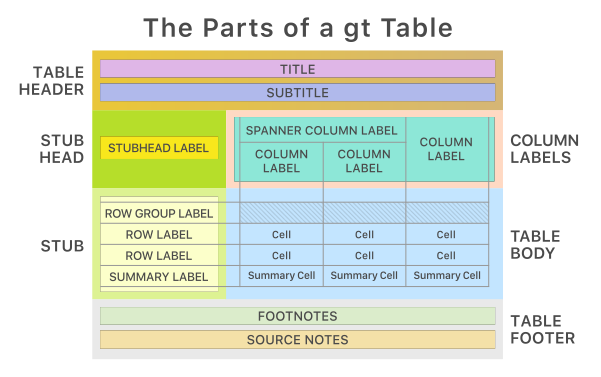
This page covers how to style and theme your table using `GT.tab_options()`,
which is meant to quickly set a broad range of styles.
We'll use the basic GT object below for most examples, since it marks some of the table parts.
"""
tabs """
from great_tables import GT, exibble
gt_ex = (
GT(exibble.head(5), rowname_col="row", groupname_col="group")
.tab_header("THE HEADING", "(a subtitle)")
.tab_stubhead("THE STUBHEAD")
.tab_source_note("THE SOURCE NOTE")
.grand_summary_rows(fns={"GRAND SUMMARY ROW": lambda df: df.sum(numeric_only=True)})
)
gt_ex
""", """
library(gt)
library(dplyr)
gt_ex <- exibble |>
slice_head(n = 5) |>
gt(rowname_col = "row", groupname_col = "group") |>
tab_header("THE HEADING", "(a subtitle)") |>
tab_stubhead("THE STUBHEAD") |>
tab_source_note("THE SOURCE NOTE") |>
grand_summary_rows(
columns = where(is.numeric),
fns = list(label = "GRAND SUMMARY ROW", fn = "sum")
)
gt_ex
""":
nbCode:
import tabelline, tabelline/datasets, gtdata

let gtEx = tabella(exibble().head(5), rownameCol = "row", groupnameCol = "group"):
  tabHeader "THE HEADING", "(a subtitle)"
  tabStubhead "THE STUBHEAD"
  tabSourceNote "THE SOURCE NOTE"
  grandSummaryRows:
    "GRAND SUMMARY ROW": agg.sum

nbTable gtEx
nbText: """
## Table option parts
As the graph above showed, tables are made of many parts---such as the heading, column labels, and stub. `GT.tab_options()` organizes options based on table part.
The code below illustrates the table parts `GT.tab_options()` can target, by setting the background color for various parts.
"""
tabs """
(
gt_ex
.tab_options(
container_width = "100%",
table_background_color="lightblue",
heading_background_color = "gold",
column_labels_background_color="aquamarine",
row_group_background_color="lightyellow",
stub_background_color="lightgreen",
source_notes_background_color="#f1e2af",
grand_summary_row_background_color="lightpink",
)
)
""", """
gt_ex |>
tab_options(
container.width = "100%",
table.background.color = "lightblue",
heading.background.color = "gold",
column_labels.background.color = "aquamarine",
row_group.background.color = "lightyellow",
stub.background.color = "lightgreen",
source_notes.background.color = "#f1e2af",
grand_summary_row.background.color = "lightpink"
)
""":
nbCode:
let parts = tabella(gtEx):
  tabOptions:
    containerWidth = "100%"
    tableBackgroundColor = "lightblue"
    headingBackgroundColor = "gold"
    columnLabelsBackgroundColor = "aquamarine"
    rowGroupBackgroundColor = "lightyellow"
    stubBackgroundColor = "lightgreen"
    sourceNotesBackgroundColor = "#f1e2af"
    grandSummaryRowBackgroundColor = "lightpink"
nbTable parts
tabelline """
`tabOptions` is a macro (with `tabella(data): body` and `tableData:`, one of tabelline's
three): the options are `TabOptions`' fields, in camelCase, one `name = value` per line of its
block, and a name it does not have fails when compiling, not when running. The grand summary
row sums up the numeric columns, as `numeric_only=True` does in pandas.
"""
nbText: """
Notice two important pieces:
* The argument `heading_background_color="gold"` sets the heading part's background to gold.
* Parts like `container` and `table` are the broadest. They cover all the other parts of the table.
## Finding options: part, type, attribute
Option names follow this format:
```python
{part name}_{type}_{attribute}
```
For example, the option `row_group_border_top_color` has these pieces:
* **part**: `row_group`
* **type**: `border_top`
* **attribute**: `color`
Here are the parts supported in `GT.tab_options()`:
* container, table
* heading, source_note
* column_labels, row_group, stub, stub_row
* table_body
"""
tabelline """
The same names in camelCase: `rowGroupBorderTopColor`. tabelline has every part of Great
Tables, and the summary rows: 142 options in all.
"""
nbText: """
## Styling borders
Many table parts support customizing border colors and style.
This is shown below for column labels.
"""
tabs """
gt_ex.tab_options(
column_labels_border_top_color="blue",
column_labels_border_top_style="solid",
column_labels_border_top_width="5px"
)
""", """
gt_ex |>
tab_options(
column_labels.border.top.color = "blue",
column_labels.border.top.style = "solid",
column_labels.border.top.width = px(5)
)
""":
nbCode:
let borders = tabella(gtEx):
  tabOptions:
    columnLabelsBorderTopColor = "blue"
    columnLabelsBorderTopStyle = "solid"
    columnLabelsBorderTopWidth = "5px"
nbTable borders
nbText: """
## Styling background color
"""
tabs """
gt_ex.tab_options(
heading_background_color="purple"
)
""", """
gt_ex |>
tab_options(
heading.background.color = "purple"
)
""":
nbCode:
let purple = tabella(gtEx):
  tabOptions headingBackgroundColor = "purple"
nbTable purple
tabelline """
On a dark background tabelline writes the heading in white, as Great Tables does: the colour
may be a name, as here, or a value.
"""
nbText: """
## Styling body cells
The table body can style the lines between individual cells. Use the `hline` and `vline` option types to specify cell line color, style, and width.
For example, the code below changes horizontal lines (`hline`) between cells to be red, dashed lines.
"""
tabs """
gt_ex.tab_options(
table_body_hlines_color="red",
table_body_hlines_style="dashed",
table_body_hlines_width="4px",
)
""", """
gt_ex |>
tab_options(
table_body.hlines.color = "red",
table_body.hlines.style = "dashed",
table_body.hlines.width = px(4)
)
""":
nbCode:
let hlines = tabella(gtEx):
  tabOptions:
    tableBodyHlinesColor = "red"
    tableBodyHlinesStyle = "dashed"
    tableBodyHlinesWidth = "4px"
nbTable hlines
nbText: """
In order to define the vertical lines between cells, set `vline` styles. For example, the code below makes both horizontal and vertical lines between cells solid.
"""
tabs """
gt_ex.tab_options(
table_body_hlines_style="solid",
table_body_vlines_style="solid",
)
""", """
gt_ex |>
tab_options(
table_body.hlines.style = "solid",
table_body.vlines.style = "solid"
)
""":
nbCode:
let lines = tabella(gtEx):
  tabOptions:
    tableBodyHlinesStyle = "solid"
    tableBodyVlinesStyle = "solid"
nbTable lines
nbText: """
## Set options across table parts
Some options starting with `table_` apply to all parts of the table.
For example, fonts and background color apply everywhere.
"""
tabs """
gt_ex.tab_options(
table_background_color="green",
table_font_color="darkblue",
table_font_style="italic",
table_font_names="Times New Roman"
)
""", """
gt_ex |>
tab_options(
table.background.color = "green",
table.font.color = "darkblue",
table.font.style = "italic",
table.font.names = "Times New Roman"
)
""":
nbCode:
let fonts = tabella(gtEx):
  tabOptions:
    tableBackgroundColor = "green"
    tableFontColor = "darkblue"
    tableFontStyle = "italic"
    tableFontNames = "Times New Roman"
nbTable fonts
nbText: """
Options set across the whole table, can be overridden by styling a specific part.
"""
tabs """
gt_ex.tab_options(
table_background_color="orange",
heading_background_color="pink"
)
""", """
gt_ex |>
tab_options(
table.background.color = "orange",
heading.background.color = "pink"
)
""":
nbCode:
let overridden = tabella(gtEx):
  tabOptions:
    tableBackgroundColor = "orange"
    headingBackgroundColor = "pink"
nbTable overridden
nbText: """
## A basic theme
Based on the sections above, we can design an overall theme for a table.
This requires setting a decent number of options, but makes a big difference when presenting a table! Below is a table with a simple, blue theme. (The code is hidden by default, but can be expanded to see all the options set).
"""
tabs """
from great_tables import GT, exibble

# TODO: are there names we can give the three colors?
# e.g. primary = "#0076BA", etc..

(GT(exibble, rowname_col="row", groupname_col="group")
    .tab_header("THE HEADING", "(a subtitle)")
    .tab_stubhead("THE STUBHEAD")
    .tab_source_note("THE SOURCE NOTE")
    .tab_options(
        # table ----
        table_border_top_color="#004D80",
        table_border_bottom_color="#004D80",

        # heading ----
        heading_border_bottom_color="#0076BA",

        # column labels ----
        column_labels_border_top_color="#0076BA",
        column_labels_border_bottom_color="#0076BA",
        column_labels_background_color="#FFFFFF",

        # row group ----
        row_group_border_top_color="#0076BA",
        row_group_border_bottom_color="#0076BA",

        # stub ----
        stub_background_color="#0076BA",
        stub_border_style="solid",
        stub_border_color="#0076BA",

        # table body ----
        table_body_border_top_color="#0076BA",
        table_body_border_bottom_color="#0076BA",
        table_body_hlines_style="none",
        table_body_vlines_style="none",

        # misc ----
        #row_striping_background_color="#F4F4F4"
    )

)
""", """
gt(exibble, rowname_col = "row", groupname_col = "group") |>
  tab_header("THE HEADING", "(a subtitle)") |>
  tab_stubhead("THE STUBHEAD") |>
  tab_source_note("THE SOURCE NOTE") |>
  tab_options(
    # table ----
    table.border.top.color = "#004D80",
    table.border.bottom.color = "#004D80",

    # heading ----
    heading.border.bottom.color = "#0076BA",

    # column labels ----
    column_labels.border.top.color = "#0076BA",
    column_labels.border.bottom.color = "#0076BA",
    column_labels.background.color = "#FFFFFF",

    # row group ----
    row_group.border.top.color = "#0076BA",
    row_group.border.bottom.color = "#0076BA",

    # stub ----
    stub.background.color = "#0076BA",
    stub.border.style = "solid",
    stub.border.color = "#0076BA",

    # table body ----
    table_body.border.top.color = "#0076BA",
    table_body.border.bottom.color = "#0076BA",
    table_body.hlines.style = "none",
    table_body.vlines.style = "none"

    # misc ----
    # row.striping.background_color = "#F4F4F4"
  )
""":
nbCode:
let blue = tabella(exibble(), rownameCol = "row", groupnameCol = "group"):
tabHeader "THE HEADING", "(a subtitle)"
tabStubhead "THE STUBHEAD"
tabSourceNote "THE SOURCE NOTE"
tabOptions:
# table ----
tableBorderTopColor = "#004D80"
tableBorderBottomColor = "#004D80"# heading ----
headingBorderBottomColor = "#0076BA"# column labels ----
columnLabelsBorderTopColor = "#0076BA"
columnLabelsBorderBottomColor = "#0076BA"
columnLabelsBackgroundColor = "#FFFFFF"# row group ----
rowGroupBorderTopColor = "#0076BA"
rowGroupBorderBottomColor = "#0076BA"# stub ----
stubBackgroundColor = "#0076BA"
stubBorderStyle = "solid"
stubBorderColor = "#0076BA"# table body ----
tableBodyBorderTopColor = "#0076BA"
tableBodyBorderBottomColor = "#0076BA"
tableBodyHlinesStyle = "none"
tableBodyVlinesStyle = "none"
nbTable blue
tabelline """
The stub is written in white on its dark blue fill, as in Great Tables: tabelline picks the
text colour for the background of the heading, the column labels, the stub, the row groups
and the summary rows, and `dataColor` for each fill (`autoColorText`).
"""
bookSave()
